
Front of House
Every order in plain view.
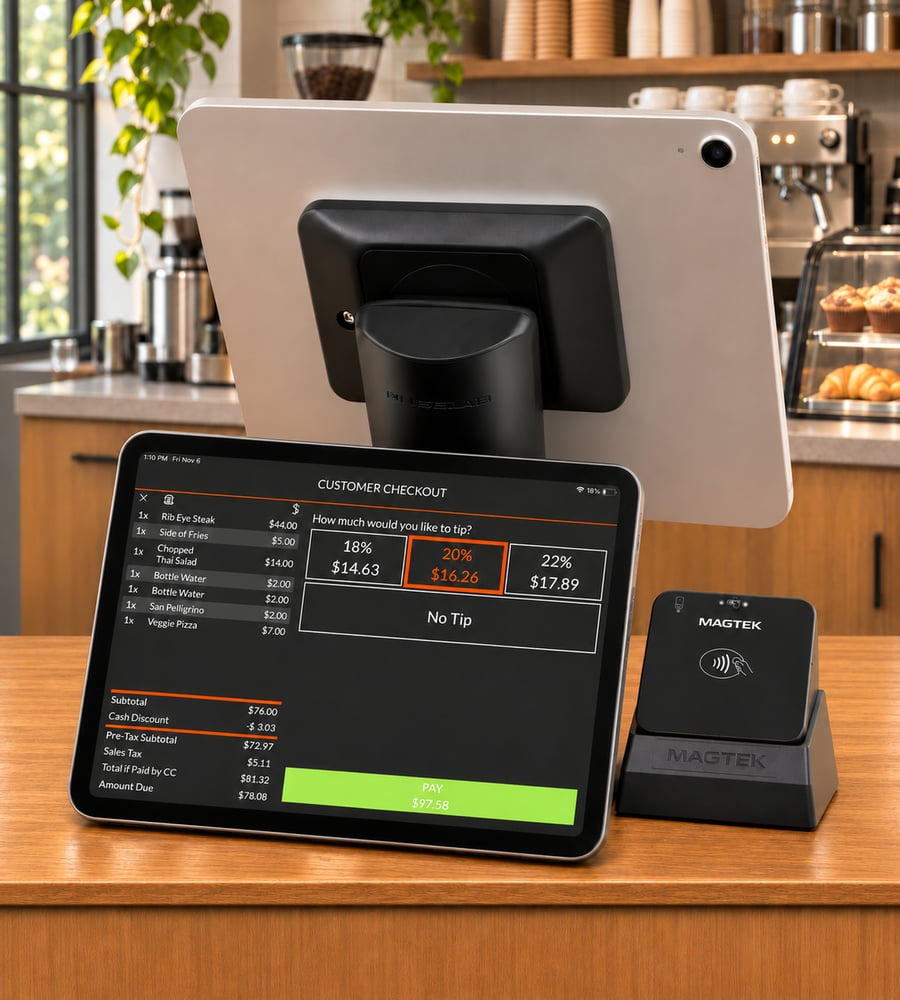
Give guests a clear view of their order as it’s entered. EDGESERV® customer-facing display brings order details, menu images, and promotions to the counter.
-
Let Guests Follow Along: Display the order line by line as staff ring it in. Guests can review what’s on screen and point out a change while they’re still at the counter.
-
Put Your Menu on Display: Show menu item images with the order and use scrolling promotional images to feature specials or something new to try.
-
Complete the Checkout: Support contactless payment and signature capture as part of the customer-facing checkout setup.
-
Give Guests a Way to Tip: Present suggested tip amounts during checkout so guests can make their selection on screen.
Questions about customer-facing displays?
Can guests receive an emailed receipt?
Yes. The customer-facing display can prompt guests about a receipt and offer an email receipt option.
What appears between transactions?
Rotating marketing images can highlight specials, offers, and other promotions between transactions.
Can guests review their order and complete payment?
Yes. The display shows items line by line, with menu images. Customer-facing checkout also supports contactless payments and signature capture.
See both sides of the counter.
Walk through an order and checkout in an EDGESERV® demo.